Getting started
This guide sets up Milieu for a realistic scenario: a contact centre for a broadband provider. A frontline agent answers customer conversations from a knowledge base of policies and runbooks, and remembers past conversations. A supervisor and an auditor oversee its work.
By the end, you’ll have:
- A running Milieu environment with three agents in distinct roles.
- A knowledge base ingested and searchable (lexically, optionally semantically).
- Tools (permissions and skills) so the frontline agent can consult the knowledge base while answering.
- Conversation memory: past conversations saved as knowledge events and recalled in later answers.
- Three ways to respond to new conversations: one-off, synchronous request/reply, and a fully autonomous daemon.


You can copy and paste every command in the following sections, in order. To
watch it run first, run make demo: it replays this whole guide as a script
against examples/minimal/, echoing each command before it runs.
After you finish, the
USER-GUIDE covers each feature in depth, OPERATIONS
covers running the servers and stack, and REFERENCE lists every
command and flag.
Contents
- Build and initialise
- Create the agents
- Ingest the knowledge base
- Set up tools
- Have a first conversation
- Save conversation memory
- Respond to new conversations
- Audit the operation
- Go further with per-client projects
- Where to go next
Build and initialise
Prerequisites: Go 1.26 or later, and a sandbox backend. sandbox-exec is built
into macOS. On Linux, install bwrap.
git clone <repo> && cd milieu
make build                              # produces ./milieu
For the fast path, run ./milieu setup. It asks the questions that this section
and the next three answer by hand (sandbox, model, embeddings, a roster of
agents, a knowledge base, and which servers to stand up), then writes the
answers to milieu.yaml and applies it. If you choose the contact-centre
starter, one command takes you to the end of Set up tools, with
the same three agents and the same knowledge files that the following sections
use. Everything after that (skills, memory, conversations, the daemon, and the
audit log) still runs as written.
The rest of this guide takes the long way: you create each piece individually, so the manifest is legible afterwards.
export MILIEU_HOME=$PWD/.milieu          # all state lives here
export ANTHROPIC_API_KEY=sk-ant-...      # enables LLM-driven skills (claude backend)
# The sandbox auto-resolves per platform (sandbox-exec on macOS, bwrap on
# Linux); set MILIEU_SANDBOX only to override.
To use OpenRouter (or any OpenAI-compatible gateway) instead of Anthropic, set
MILIEU_LLM=openai with OPENROUTER_API_KEY, and choose a model with
MILIEU_LLM_MODEL (default anthropic/claude-haiku-4.5). For details, see
REFERENCE.
Without any large language model (LLM) credentials, skills fall back to an
echo backend. That’s useful for plumbing checks, but the contact-centre
answers in the following sections need a real model.
Create the agents
A contact centre has roles, and so do Milieu agents:
- mira is the frontline associate. She does the work: answering conversations.
- arun is the administrator and can dispatch work to any agent.
- vera is the auditor. She is read-only: she reviews the audit log and cannot send messages.
./milieu agent create mira                      # default role: associate
./milieu agent create arun --role administrator
./milieu agent create vera --role auditor
./milieu agent ls
Each agent gets a directory under $MILIEU_HOME/var/agents/<code>/ holding
its identity (agent.toml), personality and responsibility briefs
(personality.md, responsibility.md), skills, and message queues.
Ingest the knowledge base
Knowledge is hand-authored Markdown, layered by stability: axioms/
(slow-changing truths), articles/ (curated docs), news/ (time-sensitive),
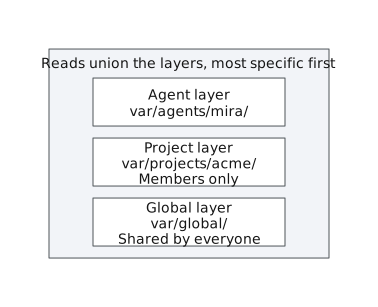
and events/ (discrete occurrences). It’s scoped in three layers, all under
var/: the global base at var/global/knowledge/ (shared by everyone),
each agent’s own base at var/agents/<code>/knowledge/, and per-project bases
at var/projects/<code>/knowledge/ (membership-gated). Reads union the
applicable layers most-specific-first (agent over project over global), and a
more-specific file shadows a lower one on a name clash.
Seed the global base with the material a contact centre runs on (a tone policy, a refund policy, a troubleshooting runbook, and a current outage notice):
mkdir -p .milieu/var/global/knowledge/{axioms,articles,news,events}

cat > .milieu/var/global/knowledge/axioms/tone.md <<'EOF'
# Tone of voice
Always be courteous and concise. Apologise once for any inconvenience,
then move to the resolution. Never promise credits beyond policy.
EOF

cat > .milieu/var/global/knowledge/articles/refund-policy.md <<'EOF'
# Refund policy
Customers are entitled to a pro-rata service credit for any outage
longer than 4 consecutive hours. Credits are applied to the next
invoice, not refunded to card. Requests older than 60 days are not
eligible.
EOF

cat > .milieu/var/global/knowledge/articles/router-troubleshooting.md <<'EOF'
# Router troubleshooting runbook
1. Ask the customer to power-cycle the router (off 30 seconds, then on).
2. Check the line status in the diagnostics portal.
3. If the DSL light stays red after a power-cycle, book an engineer
   visit; the earliest slot is usually within 48 hours.
EOF

cat > .milieu/var/global/knowledge/news/outage-east-region.md <<'EOF'
---
type: news
title: "Ongoing: East region outage"
tags: [outage, credit]
stale_after: 2026-06-15T18:00:00Z
---
# Ongoing: East region outage
Since 06:00 today there is a fibre cut affecting the East region.
Estimated restoration is 18:00. Affected customers qualify for the
standard outage credit.
EOF
That last file carries
Open Knowledge Format (OKF)
frontmatter: still Markdown, with a little YAML metadata. Frontmatter is
optional (the three preceding files have none and work fine), but stale_after
matters here: after the restoration time passes,
this notice is flagged everywhere it appears and --fresh drops it, so a
notice for a finished outage no longer outranks current policy. USER-GUIDE →
Metadata covers the rest of the
vocabulary.
Index the knowledge base, and then verify that search works:
./milieu knowledge reindex                   # "indexed 4 item(s) in the global layer (lexical)"
./milieu knowledge ls                        # browse by layer
./milieu knowledge search "outage credit"    # hybrid search (falls back to lexical)
./milieu knowledge search --fresh "outage credit"   # same, minus anything past its stale_after
./milieu knowledge get articles/refund-policy.md
Rerun ./milieu knowledge reindex whenever knowledge files change.
Optional: semantic search
Lexical (FTS5) search matches terms. Semantic search matches meaning, so “my
internet is down” finds the outage notice even though no words overlap.
Embedding runs out of process: Milieu calls an OpenAI-compatible endpoint, such
as a local llama-server (used in the following example) or Voyage. For
details, see OPERATIONS → Semantic search.
llama-server -m nomic-embed-text.gguf --embeddings --port 8080 &
export MILIEU_EMBED=openai MILIEU_EMBED_URL=http://localhost:8080/v1
./milieu knowledge reindex                   # now says "lexical + semantic"
./milieu knowledge search --sem "my internet is down"
Set up tools
Agents can invoke only what they’ve been granted. Mira needs the built-in
read-only knowledge tool, so that her skills can search and read the knowledge
base, and the memory tool, to recall and save past conversations. Both need
search and get: search returns a snippet, and she needs the whole document (or the
whole prior conversation) before she can answer from it. The session tool
lets a reply say that she needs something from the customer before she can finish.
./milieu permission grant mira 'knowledge(search:*)'
./milieu permission grant mira 'knowledge(get:*)'
./milieu permission grant mira 'memory(search:*)'
./milieu permission grant mira 'memory(get:*)'
./milieu permission grant mira 'memory(save:*)'
./milieu permission --as mira ls
Now give mira a respond skill. A skill follows Anthropic’s Agent Skills
format: a directory holding a SKILL.md manifest (YAML frontmatter and a body)
and, optionally, bundled resource files the model reads on demand. A flat
skills/<name>.md file works too for quick one-offs. allowed-tools
exposes granted CLIs to the model as callable tools. The name respond
matters: it’s the default skill that milieu wake and the daemon invoke when
they handle incoming messages.
mkdir -p .milieu/var/agents/mira/skills/respond/references

cat > .milieu/var/agents/mira/skills/respond/SKILL.md <<'EOF'
---
name: respond
description: Answer a customer conversation using the knowledge base
version: 1.0.0
metadata:
  author: ops-team
allowed-tools:
  - knowledge(search:*)
  - knowledge(get:*)
  - memory(search:*)
  - memory(get:*)
  - memory(save:*)
  - session(request-input:*)
---
You are a frontline contact-centre agent. You receive one customer
message (possibly with a From/Subject header).

1. Search the knowledge base for the customer's issue
   (knowledge, args=["search", "--current", "<keywords>"]). Try a couple of
   phrasings. --current returns only what is still in force: it drops policies
   that are stale, deprecated, or superseded by a newer one, so you cannot
   answer from a retired rule.
2. Read promising hits in full (knowledge, args=["get", "<path>"]).
3. Check for prior conversations with this customer
   (memory, args=["search", "<customer name or account>"]), read any hit in
   full (memory, args=["get", "<name>"]), and acknowledge relevant history.
4. Reply in 2-4 courteous sentences following the tone axioms, citing
   policy where relevant. If the knowledge base has no answer, follow
   references/escalation.md — do not invent policy.
5. If you cannot finish without something only the customer can give you —
   an order number, a date, a choice between options — say so first
   (session, args=["request-input", "<what you need>"]) and then ask for it.
   That marks the conversation as waiting on them, so it shows up as
   outstanding rather than looking answered.
EOF

cat > .milieu/var/agents/mira/skills/respond/references/escalation.md <<'EOF'
# When to escalate
Escalate when the request falls outside documented policy, the customer
threatens legal action, or there is a safety concern. Say you are
escalating to a supervisor; do not promise an outcome or a timeframe.
EOF

./milieu skill --as mira ls          # shows: respond@1.0.0
The bundled references/escalation.md is progressively disclosed: the system
prompt lists only its path, and mira reads it mid-conversation through the
built-in read-only skill tool when she needs it. No permission grant is
required, and every read is audited.
Validate the whole configuration (TOML, frontmatter, declared-but-ungranted tools, and missing files):
./milieu lint miraHave a first conversation
Skills read their input from stdin. To handle a customer directly, pipe the
message to act:
echo "Hi, my internet has been down in the East region since this morning. \
Do I get money back?" | ./milieu act --as mira respond
Mira searches the knowledge base, finds the outage notice and the refund policy,
and answers with the pro-rata credit terms. Every knowledge call she makes is
in the audit log (see Audit the operation).
Save conversation memory
Memory is a separate store, scoped in the same three layers as knowledge: the
global memory at var/global/memory/, each agent’s own at
var/agents/<code>/memory/, and per-project memory at
var/projects/<code>/memory/ (membership-gated). Reads union the layers
most-specific-first. Writes target a layer by context: --in <project> writes
the project layer, --global writes the global layer, and otherwise writes go
to the agent’s own. Save the conversation into mira’s own memory:
./milieu memory --as mira save priya-sharma <<'EOF'
# Conversation: Priya Sharma (account 48213) — 2026-06-09
Customer reported no connectivity in the East region since morning.
Confirmed the ongoing fibre-cut outage (ETA 18:00) and that the account
qualifies for the standard pro-rata outage credit on the next invoice.
Customer satisfied; no engineer visit needed. Follow-up: verify the
credit appears on the July invoice.
EOF
In practice, the memory tool writes this from inside the skill after each
conversation. When the same customer returns, mira now recalls the history
(step 3 of her skill):
echo "This is Priya Sharma again, account 48213. You promised me a credit \
last week — where is it?" | ./milieu act --as mira respond
Mira finds the saved memory, acknowledges the prior conversation, and answers from the refund policy (credits land on the next invoice).
Respond to new conversations


Synchronous: ask and wait for the reply
milieu ask sends a message and blocks until the matching reply arrives, which
is useful for connecting Milieu to a chat widget or a shell pipeline. It needs
either the daemon (see the following section) or manual routing. To route
manually:
# manual routing variant (no daemon): arun forwards a conversation to mira
MILIEU_AGENT=arun ./milieu message send mira "ticket-1042" \
    <<< "Customer says the DSL light on the router is red. What should they do?"
./milieu route                           # deliver outbound -> inbound
./milieu wake --as mira                  # mira runs 'respond' on her inbox
./milieu route                           # deliver mira's reply back
MILIEU_AGENT=arun ./milieu message inbox
MILIEU_AGENT=arun ./milieu message read 1
Autonomous: run the daemon
milieu daemon polls every agent’s inbox, runs respond on each unread
message, and routes the replies, with no manual route or wake:
./milieu daemon --interval 1s &Tip: run the whole stack at once. For development or demos, you can bring up the embedding server, REST API, and router together with process-compose:
process-compose up. Add the trusted-zone gateway withprocess-compose up -f process-compose.yaml -f process-compose.gateway.yaml. For details, seeprocess-compose.yamland OPERATIONS → Running the stack.
With the daemon running, the whole loop becomes one blocking call:
echo "Customer on chat: internet down in East region, asking about \
compensation." | ./milieu ask --as arun --to mira --timeout 60s
The reply body prints to stdout (exit 0 on reply, 124 on timeout), so you
can pipe it into other commands:
echo "Router DSL light is red after a restart." \
    | ./milieu ask --as arun --to mira | tee /tmp/reply.txt
Replies carry a reply_depth capped at 5, so two agents can’t fall into an
infinite reply loop. Stop the daemon with kill %1 (it exits cleanly on
SIGINT/SIGTERM).
Let the model pick the skill
So far, you’ve named the skill yourself. If you give mira a second skill, she can route incoming work herself. Selection uses only each skill’s name and description, so write descriptions like routing rules:
cat > .milieu/var/agents/mira/skills/handover.md <<'EOF'
---
name: handover
description: Summarise conversation logs into a shift-handover briefing
---
Summarise the conversations below for the incoming shift in five
bullet points: open issues first, then resolved ones.
EOF

# one-off: --auto instead of a skill name
./milieu memory --as mira get priya-sharma \
    | ./milieu act --as mira --auto      # stderr: auto-selected skill "handover"

# manual wake, dispatching per message
./milieu wake --as mira --auto

# autonomous: the daemon dispatches every message to the best-fitting skill
kill %1 && ./milieu daemon --interval 1s --auto &
In wake and the daemon, a message no skill matches falls back to respond
(with a warning), so every message is handled. A plain act --auto with no
match fails with an error. Every selection is recorded in the audit log, so
vera can review what mira answered and why a given skill handled it.
Audit the operation
Every CLI invocation and every tool call mira made (including the built-in
knowledge lookups inside her skill) is one JSON row in the append-only audit
log, with agent, command, arguments, exit code, and timestamps:
tail -n 10 .milieu/var/audit/audit.jsonlReviewing this log is vera’s job. As an auditor, she’s read-only and can’t send messages, so you can safely grant her broad inspection access without her taking part in conversations.
Go further with per-client projects
If the contact centre serves multiple clients, give each one a project, a
scoped workspace with its own instructions, member roster, and private knowledge
and memory. A project’s knowledge and memory layers sit above the global base,
so a client’s specific service-level agreements (SLAs) override the general
policy. Create the project and enrol its members with milieu project:
cat > /tmp/acme-instructions.md <<'EOF'
ACME is a premium client. Address the caller as "ACME support".
ACME's contractual outage credit threshold is 1 hour, not 4.
EOF

./milieu project create acme --name "ACME Corp support desk" \
    --instructions /tmp/acme-instructions.md
./milieu project member add acme mira
./milieu project member add acme arun
./milieu project ls
./milieu project show acme
project create lays down var/projects/acme/project.toml (code, name,
description, instructions, members) plus the project’s knowledge/ and
memory/ trees. Seed the project knowledge base and index that one layer:
mkdir -p .milieu/var/projects/acme/knowledge/articles

cat > .milieu/var/projects/acme/knowledge/articles/acme-sla.md <<'EOF'
# ACME SLA
Outages over 1 hour qualify for credit. Engineer visits within 24 hours.
EOF

./milieu knowledge --as mira --in acme reindex --scope project
echo "ACME caller: down for 2 hours, do we get credit?" \
    | ./milieu act --as mira --in acme respond
Membership gates both the project’s knowledge and its memory: only members can
act in a project. Milieu prepends the project instructions to the skill, and the
knowledge and memory tools inside the skill union ACME’s layer over the
global base (agent over project over global), so mira correctly applies the
1-hour threshold.
Quick reference
./milieu agent create <code> [--role <role>]              # create an agent
./milieu project create <code> [--name <n>]               # create a scoped workspace
./milieu project member add <code> <agent>                # enrol an agent in a project
./milieu permission grant <agent> <rule>                  # allow a CLI pattern
./milieu knowledge [--as <a>] [--in <p>] reindex          # rebuild a knowledge layer
./milieu knowledge [--as <a>] [--in <p>] search <query>   # search unioned layers
./milieu memory --as <a> [--in <p>|--global] save <name>  # write a memory layer
./milieu act --as <agent> [--in <proj>] <skill>           # run a skill (stdin -> reply)
./milieu act --as <agent> --auto                          # let the model pick the skill
./milieu ask --as <a> --to <b>                            # send, block for the reply
./milieu daemon --interval 1s [--auto]                    # autonomous message handling
./milieu lint [<agent>]                                   # validate configuration
tail -f .milieu/var/audit/audit.jsonl                     # watch the audit trail
Where to go next
- USER-GUIDE: every feature (agents, skills, knowledge, memory, messaging, projects, multimodal) in depth, with examples.
- OPERATIONS: the gateway, the REST API, declarative
provisioning with
milieu apply, the audit log, and troubleshooting. - DEPLOYMENT: take this beyond a laptop with systemd, cloud virtual machines (VMs), and Kubernetes.
- SECURITY: the trust model and a production hardening checklist.
- examples/: four complete, runnable workspaces.