Deployment
This article describes how to run Milieu beyond a laptop: on a virtual machine
(VM) under systemd or Quadlet, or on Kubernetes. The same orchestration that
drives local development drives production. Only where it runs and what
supervises it change.
Each of the four rungs builds on the previous one:
- Dev / demo:
process-compose upruns the ecosystem as native processes. See OPERATIONS → Running the stack. - VM:
systemdsupervisesprocess-compose, which supervises the ecosystem. See §1.1 Running under systemd. - VM, as containers: the release image under Podman, supervised by
systemdthrough Quadlet. See §1.2 Running under Quadlet. - Kubernetes: the milieu binaries as an Open Container Initiative (OCI)
image (built with Podman), supervised by Kubernetes. Kustomize overlays are
under
deploy/k8s/.
Milieu provisions infrastructure only on Google Cloud, where
deploy/gcp/ creates the VMs for rung 3. Elsewhere, create
hosts, networks, and firewalls with whatever tooling you already use, then
install a release bundle (§3) and a unit
(§1.1), or the Quadlet units (§1.2), on
each host.
This article covers rungs 2 to 4 and the common topologies. For where state lives on disk, see ARCHITECTURE → State and the filesystem.
1. The supervision model
Nothing about the stack changes between dev and production. The same
process-compose files (process-compose.yaml, process-compose.client.yaml,
process-compose.gateway.yaml) define ordered startup, health gating, one-shot
init/reindex steps, and per-process restarts. Production puts a systemd unit
in front so the stack starts at boot and stays up headless:


The unit runs process-compose up -f … -t=false (without the terminal UI) from
WorkingDirectory $MILIEU_HOME, so the .env auto-loads and every binary
resolves its paths from MILIEU_HOME. The full unit is in
§1.1.
1.1 Running under systemd
- Install the binaries and compose file under
MILIEU_HOME(default/opt/milieu). - Put
process-compose,milieu, andllama-serveron the servicePATH. - Create
/opt/milieu/.env. - Create
/etc/systemd/system/milieu.servicewith the following content:
[Unit]
Description=Milieu ecosystem (process-compose)
After=network-online.target
Wants=network-online.target

[Service]
User=milieu
Group=milieu
# WorkingDirectory matters: process-compose auto-loads .env from here, and
# relative paths in the compose file (e.g. gateway.toml) resolve against it.
WorkingDirectory=/opt/milieu
Environment=MILIEU_HOME=/opt/milieu
Environment=PATH=/opt/milieu/bin:/usr/local/bin:/usr/bin:/bin
# -t=false disables the TUI (required headless) and logs to stdout, so the
# journal captures everything (journalctl -u milieu).
ExecStart=/usr/local/bin/process-compose up -f /opt/milieu/process-compose.yaml -t=false
ExecStop=/usr/local/bin/process-compose down
Restart=always
RestartSec=2
# Above process-compose's 25s per-process shutdown timeout, which is above the
# servers' 10s drain grace (see section 7, "Draining on shutdown").
TimeoutStopSec=45

[Install]
WantedBy=multi-user.target- Reload
systemd, then enable and start the service:
sudo systemctl daemon-reload
sudo systemctl enable --now milieu.service
journalctl -u milieu -f                 # follow the merged process output
Milieu-specific notes:
MILIEU_HOMEmust be set in the unit. Every binary resolves all state paths from it. TheUser=account needs write access to$MILIEU_HOME/var.- process-compose handles the one-shot steps.
api-initandreindexare idempotent / health-gated processes inside the compose file, so a plainRestart=alwayson the wrapper is safe. - The gateway stays separate. Don’t add
process-compose.gateway.yamlto this unit. Give the trusted-zone gateway its own host and a secondmilieu-gateway.service(same shape,-f /opt/milieu/process-compose.gateway.yaml). - One stack per host. For multiple instances on one host, use distinct prefixes
(
/opt/milieu-staging) and one unit each.
On Kubernetes, the kubelet takes systemd’s place and supervises directly.
There’s no process-compose layer in the container. The image entrypoint runs
milieu daemon and api serve --listen 0.0.0.0:8089, environment variables
come from a ConfigMap/Secret (there’s no .env), and one role runs per pod
(the gateway pod overrides the command to gateway serve). The agent sandbox
is the one difference (see §5.5).
The entrypoint (deploy/entrypoint.sh) reads four variables of its own and
turns them into flags. The binary reads none of them:
| Variable | Default | Effect |
|---|---|---|
MILIEU_API_ENABLE | 1 | 0 runs the daemon alone, with no API server and no api init |
MILIEU_API_LISTEN | 0.0.0.0:8089 | passed to api serve --listen |
MILIEU_API_HOST | unset | passed to api init --host, a DNS subject alternative name (SAN) for the server certificate |
MILIEU_DAEMON_FLAGS | unset | extra flags for milieu daemon, split on spaces |
1.2 Running under Quadlet
This option sits between the two: the release image, the same one Kubernetes
runs, supervised by systemd through Podman’s
Quadlet,
one role per VM. There’s no process-compose layer and no bundle to unpack. A
release is an image tag.


The units are in deploy/quadlet/, installed by
milieu-deploy, which the image carries: milieu-deploy v1.2.0 on a host pulls
that release, copies its units and script out of it, and restarts, so the units
always match the image they run.
Unlike in a pod, the agent sandbox works. bwrap runs inside the container,
unprivileged, in the pod’s user namespace. The milieu unit lifts the three
defaults that stop bwrap from mounting its /proc (masked /proc paths,
SELinux container_t, AppArmor containers-default) and keeps the rest: the
default seccomp profile, every capability dropped, no-new-privileges, and a
fixed user namespace, so root in the container is an unprivileged host UID. See
deploy/quadlet → The sandbox.
2. Building blocks: roles
A deployment is a set of hosts, each running one role. A role is which
process-compose file(s) the host runs, whether it has a local embedder, and
what it must accept inbound:
| Role | Runs | Local embedder? | Trust boundary |
|---|---|---|---|
app | process-compose.yaml (api + daemon + embeddings) | yes | one tenant |
client | process-compose.client.yaml (api + daemon) | no (remote) | one tenant |
embed | llama-server only | n/a (it is the embedder) | shared compute |
gateway | process-compose.gateway.yaml | no | separate |
staging | process-compose.yaml, smaller box | yes | one tenant |
The following properties let these roles compose cleanly:
- Embeddings are stateless pure compute. Milieu is a client of the
embedder, so one
embedhost can serve many stacks (clienthosts). - Each tenant is fully isolated. An
app/client/staginghost has its own$MILIEU_HOME(agents, knowledge, memory, audit log) on its own host. Hosts share only what you make shared (anembedserver). - The gateway lives apart. It mediates the trusted zone and gets its own host
and trust boundary, never co-tenanted with an
apphost. - Graceful degradation. If the embedder is unavailable, semantic search falls back to lexical, and the stack stays up.
3. Installing on a host
A host needs the release bundle unpacked at $MILIEU_HOME, process-compose on
the service PATH, a .env, and the unit from §1.1.
Nothing is built on the host.
# from the repo root: cross-compile for the host and tar the bundle
make bundle                                    # no embedder: client/gateway roles
make bundle BUNDLE_ARCH=arm64                  # for an arm64 host
make bundle LLAMA_SERVER=/path/to/llama-server # app/embed roles need it
The bundle, dist/milieu-bundle-<os>-<arch>.tgz, unpacks at $MILIEU_HOME with
bin/milieu, bin/llama-server when LLAMA_SERVER was given, and the three
process-compose*.yaml files. Set BUNDLE_OS/BUNDLE_ARCH to match the host.
A published release already has one per supported platform:
make release VERSION=vX.Y.Z attaches them to a GitHub release, and
milieu version on the host names the release tag.
app and embed hosts also need the GGUF embedding model under
$MILIEU_HOME/models/. client and gateway hosts need neither it nor
llama-server.
4. Artifacts and secrets
The artifacts are the bundle and, for app/embed, the model (§3).
ANTHROPIC_API_KEY goes in the host’s .env or the unit’s environment. For
anything past a demo, fetch it on the host at start from a secret manager (AWS
Systems Manager (SSM) or Secrets Manager, Google Cloud Secret Manager, Vault).
Don’t bake it into an image or pass it through instance metadata, which is
readable on the instance.
The audit key (MILIEU_AUDIT_KEY, or a 0600 file named by
MILIEU_AUDIT_KEY_FILE) is provisioned the same way, on every host that writes
an audit log: app and gateway hosts, and any host running the portal or
issuer. Keep a key file outside MILIEU_HOME (in Kubernetes, a Secret mounted
outside the state volume). See
OPERATIONS → Keying the audit logs.
5. Scenarios
5.1 Single all-in-one VM (the default)
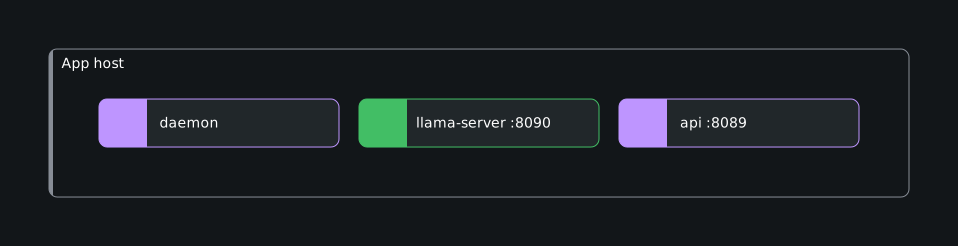
One host does everything: API, router, and a co-located llama-server. It’s
the simplest topology to operate and the right starting point: one app host
with the unit from §1.1.
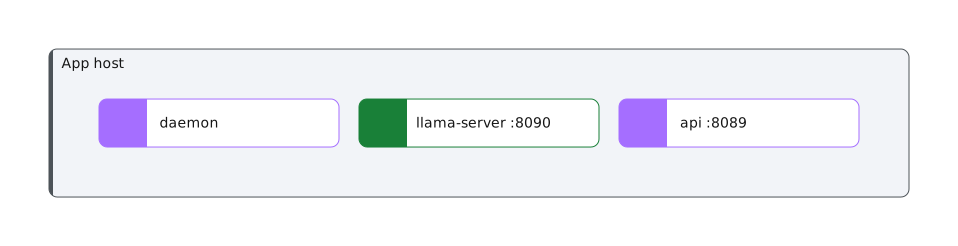
Size the host for the embedding model: a larger GGUF needs more memory.
5.2 App and trusted-zone gateway
The gateway runs on its own host in its own trust boundary and serves external
clients over mutual TLS (mTLS). The app host stays private.


The gateway host runs milieu-gateway.service over
process-compose.gateway.yaml and admits only its clients on :8443. Its
gateway.toml has to be on the host, and MILIEU_GATEWAY_CONFIG points at it,
for example $MILIEU_HOME/etc/gateway.toml.
5.3 One milieu per department, shared embed
Run several isolated milieu stacks (one per department) that share a single embedding server. You pay for the embedder (model load, RAM/GPU) one time for all stacks, and a shared model keeps the vector dimension consistent across departments.


Each department host runs the client role and sets, in its .env:
MILIEU_EMBED_URL=http://10.42.0.10:8090/v1This shape works for the following reasons:
- The
clientrole. Aclientrunsprocess-compose.client.yaml, which omits the localllama-server. With theapprole, each department would run its own embedder. - A fixed address for
embed. Clients target it by a constant address, and the embed host admits the subnet on:8090. - Blast radius. The embed host is a shared dependency, but if it’s down,
clients degrade to lexical search and keep working. A department needing a
different embedding model gets its own
embedhost.
To add a per-department gateway, give each department its own gateway host
and point it at that department’s client.
5.4 Staging alongside production
Run a smaller staging stack next to production: a separate host with its own
state, where staging is the app role on a smaller box. For a staging stack
on the same host as production, use a distinct prefix and unit (§1.1).
5.5 Kubernetes (and the sandbox caveat)
Kubernetes is the scaled-up target: many isolated stacks share one embedder, so
there’s no co-located embedder (that’s the single-VM all-in-one pattern). The
Kustomize overlays in deploy/k8s/ are
shared-embed (a standalone embed pod and one isolated client StatefulSet per
department, discovered through Service DNS) and gateway
(its own namespace). The milieu image is built with Podman from the repo-root
Containerfile. The embedder is a separate pod (for example, llama.cpp) or
Voyage.


The agent sandbox is the one thing that differs from a VM. On
Linux, Milieu isolates agent commands with bwrap, which needs nested
namespaces and bind-mounts, operations a hardened pod blocks (RuntimeDefault
seccomp denies mount/pivot_root, CAP_SYS_ADMIN is dropped). So in a
default pod, bwrap fails. The overlays therefore run with
MILIEU_SANDBOX=none and treat the pod as the isolation boundary (one
tenant per pod/namespace), which keeps the pods fully hardened (non-root, drop: [ALL], no privilege escalation). Only app/client pods run agents and hit
this. embed and gateway never do.
If you need per-agent bwrap inside a pod, grant the milieu container
CAP_SYS_ADMIN and seccompProfile: Unconfined (trusted single-tenant), or run
the stack on VMs under Quadlet (§1.2), where bwrap
works without either. For multi-tenant Kubernetes, the pod-as-boundary default is the
right fit. See
deploy/k8s/README.md.
Both overlays also ship a NetworkPolicy: ingress is denied by default, a
tenant’s pod reaches only DNS, the embedder, the gateway and public HTTPS (no
private range, no cloud metadata address), so tenants cannot reach each other,
and the gateway takes mTLS from client pods alone. They need a CNI that
enforces NetworkPolicy. See
deploy/k8s/README.md.
5.6 Google Cloud
deploy/gcp/ is an OpenTofu root module for
§1.2. It creates a virtual private cloud (VPC), one
Debian 13 VM per entry of machines (each running one role), static private and
public addresses, a data disk per VM for var/ and the model, and firewall
rules per role. Each VM provisions itself at first boot and runs
milieu-deploy.
No credential is stored on the VMs. The Anthropic key stays in Secret Manager:
the VMs’ service account can read that one secret, and milieu-deploy copies it
into a Podman secret at each deploy, so the key is never in instance metadata or
OpenTofu state. The release image goes in an Artifact Registry repository the
module creates, which the same service account can pull from with a short-lived
token. (Set image to use another registry instead, with registry_user and
registry_password if it’s private.)
An environment (prod, staging, …) is two committed files in
deploy/gcp/env/: <env>.tfvars, its settings, and <env>.gcs.tfbackend,
where its state lives. Neither holds a secret, so changes to an environment
go through review like code. deploy/gcp/tf <env> … runs OpenTofu for one
environment, and make deploy-gcp ENV=<env> TAG=… ships a release to it.
Set up a project
Someone who owns the project runs the following commands one time per project:
gcloud services enable compute.googleapis.com secretmanager.googleapis.com \
  artifactregistry.googleapis.com iap.googleapis.com
printf %s "$ANTHROPIC_API_KEY" | gcloud secrets create milieu-anthropic-api-key --data-file=-

# State for every environment, versioned so a bad write can be undone.
gcloud storage buckets create gs://<project>-milieu-tfstate --location=europe-west2 \
  --uniform-bucket-level-access
gcloud storage buckets update gs://<project>-milieu-tfstate --versioning
The people who deploy are a Google group, ops_group in the tfvars. The module
grants it what a release needs: SSH to the VMs as themselves with sudo (OS
Login, through Identity-Aware Proxy (IAP), so port 22 is closed to the
internet), and pushing to the repository. Running OpenTofu takes more, because
it creates the network, the VMs, and their Identity and Access Management (IAM)
bindings: grant the group roles/editor and
roles/resourcemanager.projectIamAdmin on the project, and
roles/storage.objectAdmin on the state bucket. Keep that to the people who
change the infrastructure if that’s fewer than those who ship.
Create an environment
cd deploy/gcp
cp env/example.tfvars env/prod.tfvars                  # then edit, and commit
cp env/example.gcs.tfbackend env/prod.gcs.tfbackend    # likewise
make -C ../.. deploy-gcp ENV=prod TAG=v1.0.0
The first release of an environment creates it: the image repository, then
the image, then the VMs, which boot the tag that was pushed. Each apply stops at
OpenTofu’s confirmation. v1.0.0 must be a Git tag first (see the following
section). First boot takes a few minutes: package install, image pulls, and the
model on app and embed VMs. The release prints the command to follow it.
deploy/gcp/tf and release act as gcloud’s account (gcloud auth login, or
CLOUDSDK_CORE_ACCOUNT to pick one), OpenTofu included, so there’s no second,
application-default login to keep in step.
Ship a release
A release is a Git tag, built one time into an image of the same name. The
repository’s tags are immutable, so every environment and every VM that runs
v1.1.0 runs the same image.
make release VERSION=v1.1.0                  # or: git tag v1.1.0 && git push origin v1.1.0
make deploy-gcp ENV=staging TAG=v1.1.0       # new: builds from the tag, pushes, deploys
make deploy-gcp ENV=prod TAG=v1.1.0          # already built: deploys the same image
make deploy-gcp ENV=prod TAG=v1.0.0          # a rollback, likewise
git commit -m "deploy(prod): v1.1.0" deploy/gcp/env/prod.tfvars
If the registry has no image TAG, deploy-gcp builds one for linux/amd64
from a clean export of the tagged commit: the working tree, committed or not,
never goes into a release. If it has one, deploy-gcp deploys that image as it
is. Either way, it then runs sudo milieu-deploy TAG on each VM through IAP
(the embed VM first, gateway VMs last, stopping at the first failure) and
sets image_tag in the environment’s tfvars, so a VM created later boots the
same release. It needs gcloud signed in as a member of the group, Podman, and
OpenTofu.


The model
llm in the tfvars chooses it. The default is Claude, with the key from the
preceding Secret Manager secret. For Gemini on Vertex AI in the same project:
llm = { provider = "vertex", model = "google/<model id>", location = "global" }The VMs then call Vertex as their own service account (roles/aiplatform.user)
and there’s no key. Enable aiplatform.googleapis.com first. location
is a Vertex region such as europe-west2, or global, where the newest models
often appear first. Every skill runs on that one model: skills name Claude
models, which the endpoint ignores in favour of model. Run the agents’ evals
against a new model before prod does.
Settings, prices, and budgets
The rest of an app or client VM’s settings go in settings, by section of
etc/milieu.toml, over what llm and embed derive. The model’s rates go in
models, which becomes etc/models.json:
settings = {
  budget = { daily = 5, monthly = 50 }   # US dollars per UTC day and month
  runs   = { max_iterations = 20 }
}
models = {
  "google/<model id>" = { input = 0.30, output = 2.50, cache_read = 0.03 }
}
milieu-deploy writes both into /var/lib/milieu/etc at every deploy, so the
tfvars own them: a Settings document applied on the VM lasts until the next
deploy. Set a budget only after every model the agents use is priced in
models, because a budget refuses a model it can’t price. env remains for
what isn’t a setting. A MILIEU_* variable there overrides milieu.toml for
the containers.
Settings reach running VMs too: ./tf prod apply updates their metadata, and
the next make deploy-gcp applies it.
The preceding scenarios are values of machines. §5.1 is the default, a single
app. §5.2 adds a gateway. §5.3 is one embed and a client per
department, and the clients are pointed at the embed VM’s private address for
you.
6. Networking and ports
All in-stack services bind to 127.0.0.1 and are reached over the loopback.
Only the gateway (and a shared embed) accept inbound connections.
| Port | Service | Exposure |
|---|---|---|
| 8089 | REST API (TLS) | localhost only. Under Quadlet, published and firewalled (api_cidrs on Google Cloud) |
| 8090 | llama-server embeddings | localhost (app), subnet-internal on a shared embed host |
| 8080 | process-compose API | localhost (used by process-compose down) |
| 8443 | gateway | the gateway’s clients only |
| 22 | SSH | your admin addresses only (lock this down) |
Egress is open: the host needs it for the Anthropic API.
7. Operations
journalctl -u milieu -f                    # merged stack logs
sudo systemctl restart milieu
sudo systemctl stop    milieu              # ExecStop runs `process-compose down`
Upgrading
Unpack the new bundle over $MILIEU_HOME, which leaves the state
under var/ alone, then systemctl restart the unit. For immutable hosts, build
the new host with the new bundle and replace the old one, keeping
$MILIEU_HOME/var on a volume that survives.
Each SQLite database under var/ records its schema version. The first start
of a new release applies any newer schema steps, in order, each in its own
transaction. A release refuses to open a database that a newer release has
already upgraded, so it cannot write to a schema it doesn’t know. Rolling back
therefore means restoring var/ from before the upgrade: copy it first.
Switching the embedding backend or model changes the vector dimension. Run
milieu knowledge reindex afterwards (the reindex process does this on boot).
Draining on shutdown
A server told to stop fails readiness, waits its
drain delay (--drain-delay, [server] drain_delay, default 0s), stops
accepting connections, and gives in-flight requests its shutdown grace
(--shutdown-grace, [server] shutdown_grace, default 10s). Requests still
running after that are answered 503. See OPERATIONS → Restarts drain
in-flight requests. This has two consequences for a deployment:
- The supervisor must wait longer than the server. Its stop timeout has to
exceed the delay plus the grace plus a few seconds (the 503s are given 2s to
go out, and telemetry up to 5s to flush), or it kills the server mid-drain.
The shipped files allow for the defaults. The Quadlet units set
StopTimeout=30(Podman’s own default, 10s, would kill at the grace) andTimeoutStopSec=45. Theprocess-composefiles give each server 25s. The Kubernetes pods haveterminationGracePeriodSecondsof 40 (API) and 30 (gateway). Raise these with the grace. - Behind a load balancer, set a drain delay. A few seconds lets the load
balancer stop routing to the server before connections are refused.
5sis a good start. For a load balancer that probes, use at least its health-check interval times its failure threshold. On Kubernetes the endpoint is withdrawn as the pod starts terminating, but kube-proxy and ingress controllers take a moment to notice. The base ConfigMap setsMILIEU_DRAIN_DELAY: 5sfor that. With nothing in front, leave it at0s.
Telemetry
Every Milieu server, and the ask, act, and wake commands,
emit OpenTelemetry traces and metrics when OTEL_ENABLED=true. It’s off by
default. Set it and the standard OTEL_* exporter variables (for example,
OTEL_EXPORTER_OTLP_ENDPOINT) in the systemd unit’s Environment= alongside
MILIEU_HOME. Point them at an OpenTelemetry Collector on the same host (or,
on Kubernetes, a sidecar or node agent), not at a remote backend. See
OPERATIONS → A collector beside Milieu.
The full matrix of spans and metrics per process is in OPERATIONS →
Observability.
8. Out of scope
Milieu ships a release bundle, an OCI image, Quadlet units, and Kubernetes
manifests. Creating hosts, networks, and firewalls is left to your own tooling
everywhere but Google Cloud (§5.6). Load balancers, DNS,
TLS termination/Automatic Certificate Management Environment (ACME), backups of
$MILIEU_HOME/var, autoscaling, and the embedding/gateway application config
are left to it everywhere.